
It’s 5:07pm.
Everyone’s hungry, the fridge is a mystery, and nobody has an answer. It doesn’t have to be like that.
KitchenLab is a quiet little system for your household. Your recipes in one place, a week that’s already decided, a grocery list that builds itself, and a pantry you actually know the contents of. That’s it. That’s the whole promise.
Free to start. No card required. Works right in your phone’s browser.
Grocery list ready32 items, 7 aisles
Week plannedin about 6 minutes
5:07
KitchenLab
K
This weekAug 10 – 16
M10
T11
W12
T13
F14
S15
S16
Recipes
Planner
Grocery
Pantry
Cook
Dinner, decided. Every night this week.
Your week, before and after
Ready to give your meal planning a makeover?
Same seven days, completely different feeling. Nothing here requires you to become a different kind of person. It just moves the thinking to a calmer moment.
The week you know
Sunday arrives with no plan.
- Monday's dinner gets decided Monday, standing in front of an open fridge.
- Three grocery trips, because each one forgets something the last one needed.
- Another bag of rice joins the two already hiding behind the cereal.
- Recipes live in six places: a screenshot, a text from your mom, a bookmark you'll never find again.
- Sunday, texting your partner from the car to ask if they need anything from the store — answered somewhere around checkout.
- 5pm hits and the answer is takeout, again, and it doesn't even taste like a treat anymore.
The week with KitchenLab
Sunday takes ten minutes. The rest is just cooking.
- Five dinners picked from recipes your family already likes, sitting on a calendar.
- One grocery list, built automatically from the plan — and it already knows what you have.
- No duplicate cumin. Your pantry is a list you can actually check.
- Every recipe in one place, added by photo, link, or typing it out.
- Your partner's in your household, so whatever they need is already on the list before you leave.
- 5pm hits and you already know. You just start.
The goal was never a perfect kitchen. It was one less decision at the worst hour of the day.
What's inside
How it works
Recipes feed the plan. The plan builds the list. The list checks the pantry. Cooking updates the pantry again. It's a loop, and it closes.
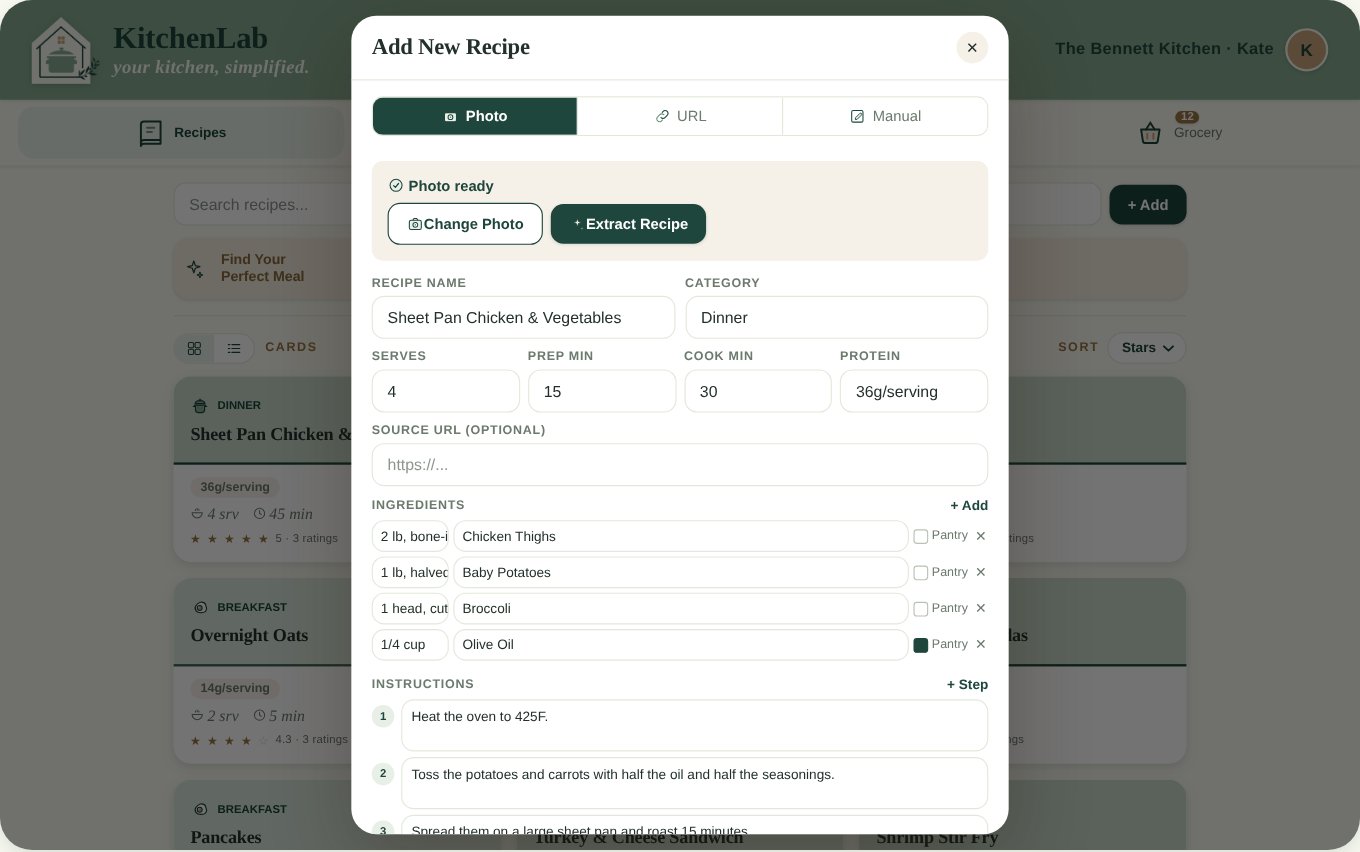
AI recipe capture
Get a recipe in, three ways
Photograph the splattered index card, paste a link, or type it out. KitchenLab reads it and files the ingredients and steps — no retyping a recipe at midnight.
- Photo, link, or manual entry
- Edit anything before you save
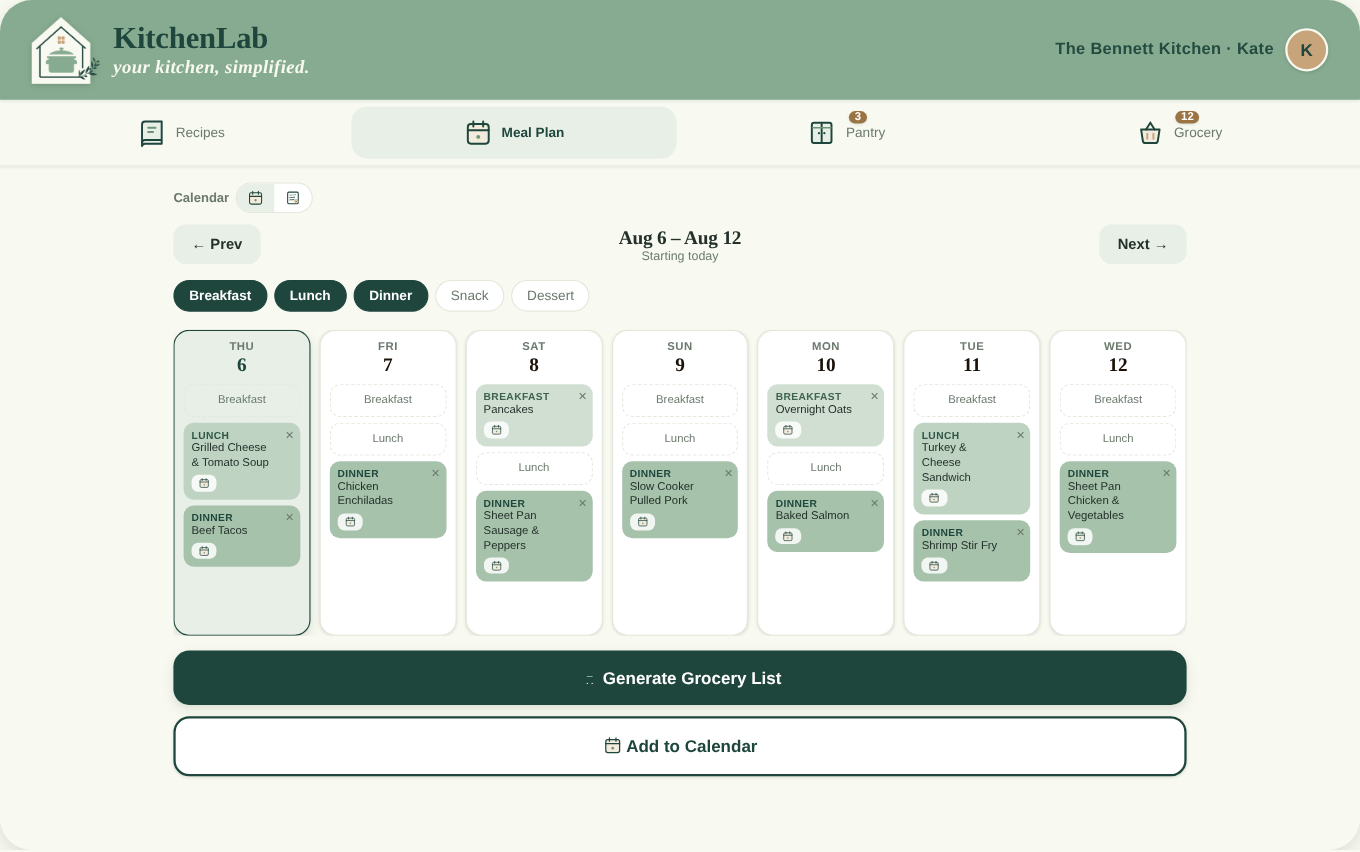
Weekly planner
Plan the week on one screen
Drop meals onto days and move them when the schedule moves. The whole week is visible at once, so nobody has to ask what's for dinner.
- Drag meals between days
- Repeat the weeks that worked
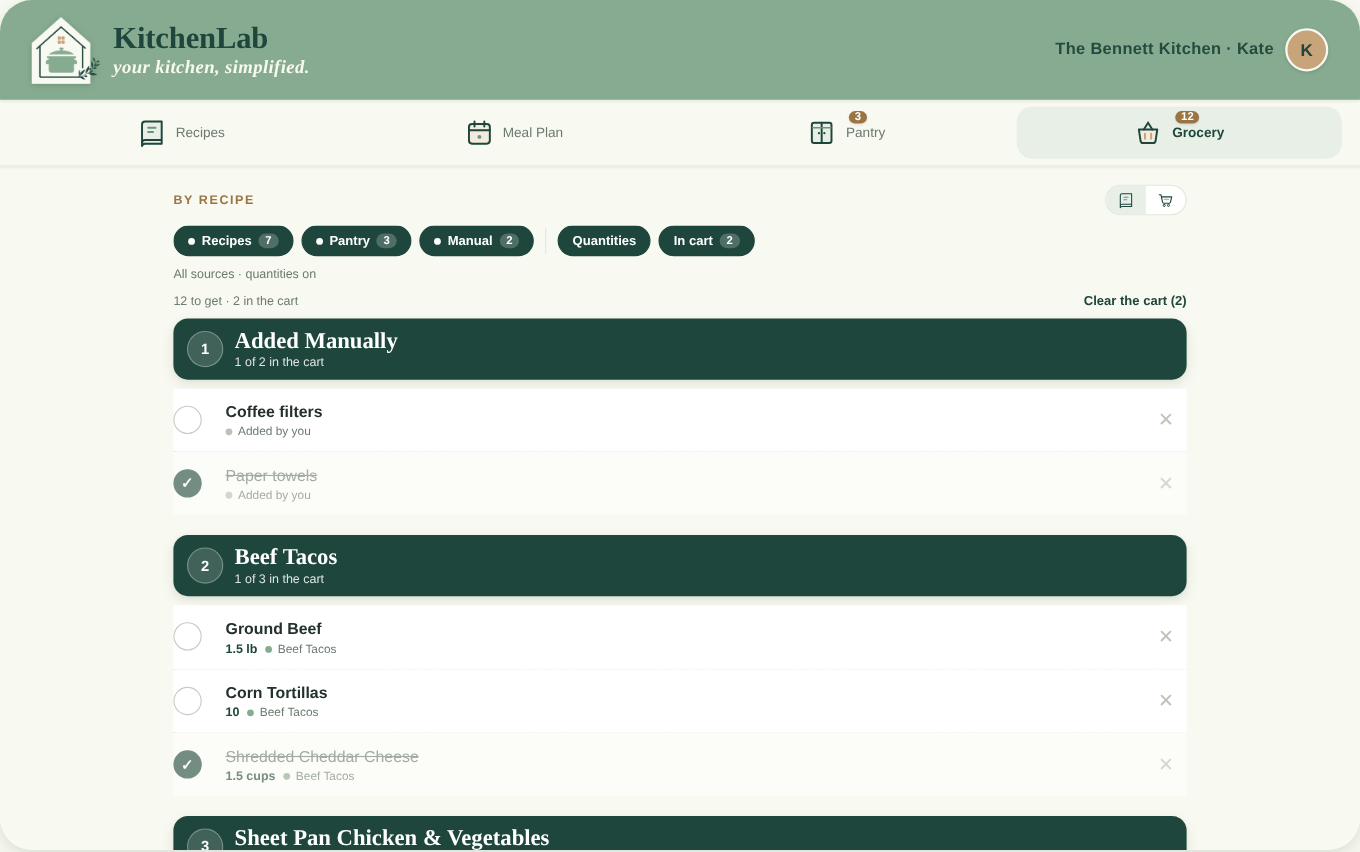
Grocery lists
A list that writes itself
Your plan becomes a grocery list automatically, with quantities combined across recipes and duplicates merged. Add the paper towels and you're done.
- Quantities added up for you
- Room for non-recipe items
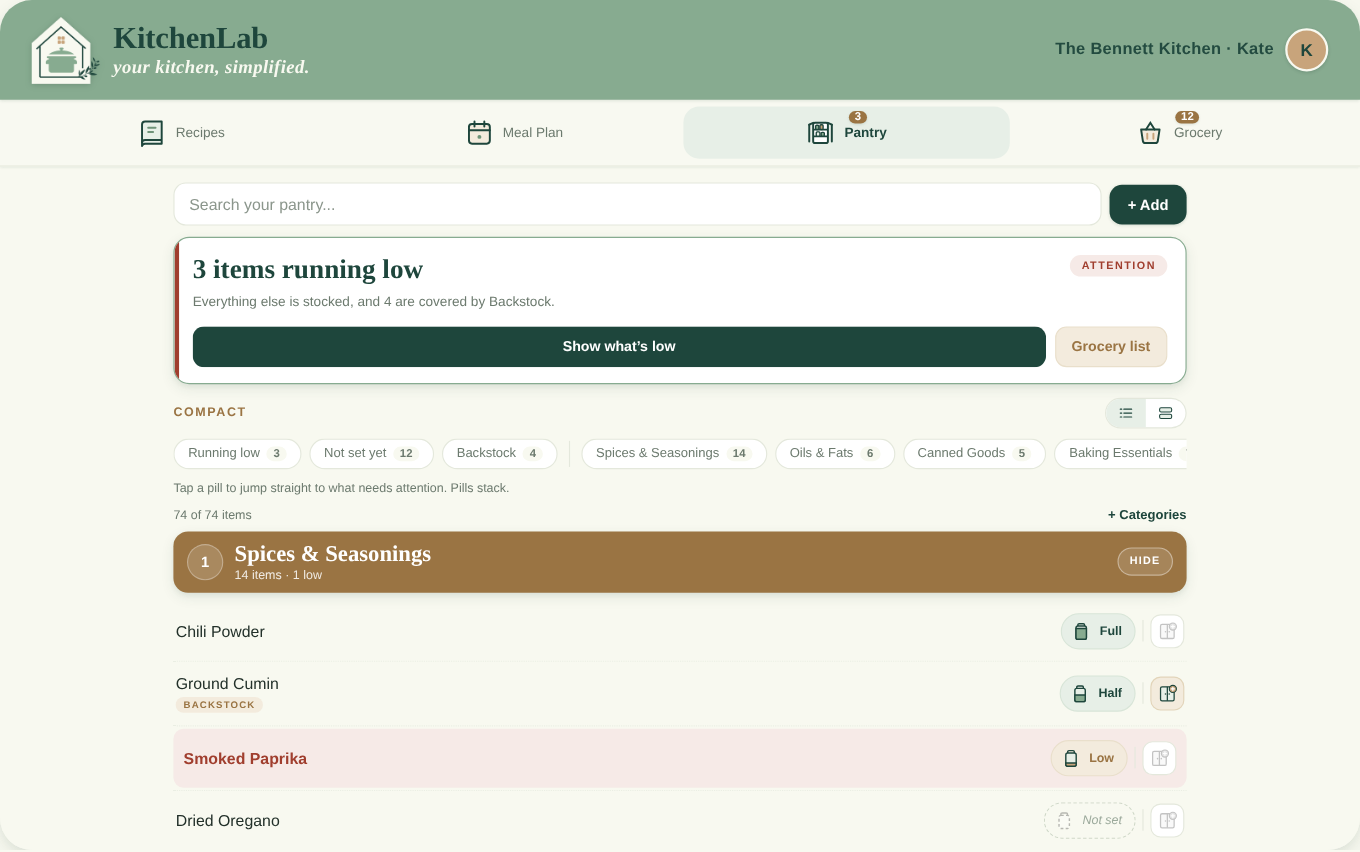
Pantry tracking
Stop buying your fourth jar of cumin
Keep a running picture of what's on your shelves. The grocery list checks against it and quietly leaves off the things you already have.
- On-hand items skipped on the list
- Low-stock flags before you shop
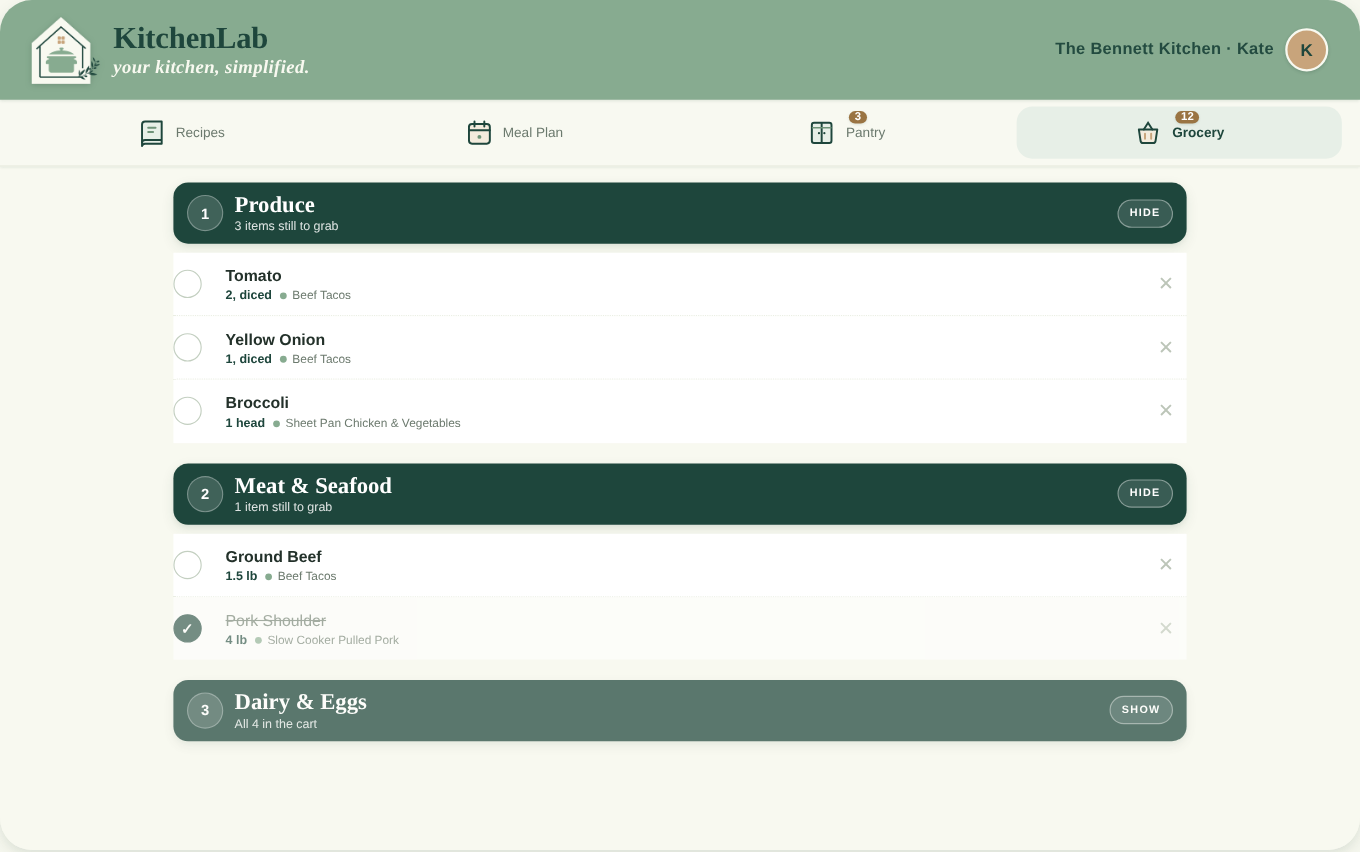
Store Mode
Walk the store in one direction
Your list re-sorts into your store's actual aisle order — produce first, dairy on the way out, tortillas in that far corner. One thumb, no backtracking for the sour cream.
- Sorted by your store's layout
- Big tap targets, one-handed
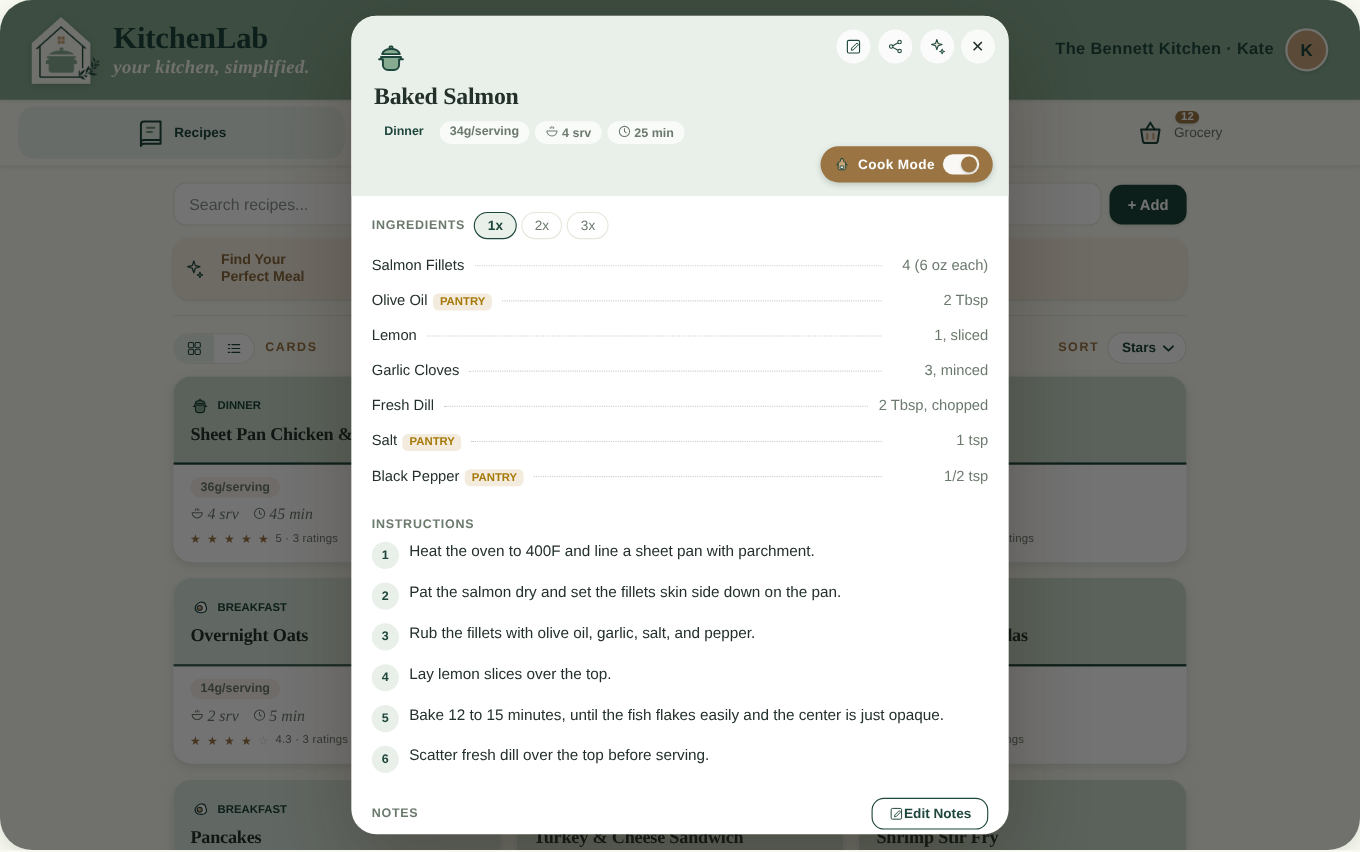
Cook Mode
Closes the loop
Big, step-by-step instructions you can read from across the counter with floury hands. When you finish, what you used comes out of the pantry — so next week's list starts accurate.
- One step at a time, large type
- Pantry updates when you're done
What sets KitchenLab apart
It learns your kitchen
Most meal planning apps are exactly the same on day one and day three hundred. This one isn't. A little setup — all at once, or a bit at a time as you go — and it starts working the way your kitchen actually works.
Most meal planning apps
KitchenLab
A generic list you can't touch
Fully editable lists
Change quantities, rename items, and add things no recipe ever called for — paper towels, sunscreen, a birthday card.
Assumes you shop at one store
Add as many stores as you actually shop
The big weekly store, the warehouse club, the little market with the good tortillas — each with its own aisle order.
Sorts the same way every time
Learns your aisles
Sort an item once — tortillas in aisle nine, not over by the bread — and it lands there automatically next time.
The same on day 100 as it was on day 1
It compounds
A little setup up front, or a bit at a time as you go, and it keeps getting more useful the longer you use it.
The Sunday text to your partner asking what to add
Your partner's already in your household
So their additions are just on the list — no text, no “need anything else?” from the checkout line.
A generic list stays generic. Yours gets a little more like your kitchen every week.

About — from the mind of a mom
Hi — I’m Kate. As a mom of 3, I’ve been juggling work, motherhood, and keeping a household running for the better part of a decade. It’s hard. Meal planning was always my biggest source of stress and seemed to be the thing that kept falling through. Some weeks I could get it together, but most weeks (days, really), my plan was whatever I could reverse-engineer at 5pm out of half an onion and some optimism. I’d buy a third jar of cumin or fourth bag of rice because I couldn’t remember if we had any. Unsurprisingly, we usually didn’t have the ONE ingredient I was SO sure I already had in the pantry! I’d go back to the store two or three times in a week and still forget the tortillas (my middle child’s favorite, of course.)
So, I started building the thing I kept wishing existed: something that held my recipes, remembered what was in my pantry (because I clearly couldn’t!), and guided me to plan I didn’t have to use every ounce of brainpower every Sunday to make sure I had the right mix of variety and “yum” for my family. Every part of it started as a problem in my own kitchen — AI recipe extraction to organize all the screenshots, written recipes, and links I seem to collect and never make. Calendar integration so I can see what actually makes sense to cook against all of our extracurricular activities. Store Mode because I was inefficiently getting my 10,000 steps walking the grocery store forwards, backwards, and upside down. Cook Mode because I was always tapping my phone to try and keep it awake… and my mental notes were insufficient for any real pantry update afterward. Our household runs on teamwork, which is also why I added the “household” feature. Even if my partner really only adds to the grocery list, it helps us streamline our communication and eliminates the constant, “need anything else from the store?” that is somehow always answered while checking out.
KitchenLab is the product of HearthLabs LLC, a small, woman-owned business in Austin, Texas. No investors, no team, just a mom with a dream of easy meal planning… and maybe even enjoying it!
I hope you enjoy the KitchenLab experience as much as I do!
From my kitchen to yours,Kate
A woman-owned small business
Your household
Cooking is a team sport
Dinner isn't one tired person doing all of it after work. It's a pour, a whisk, and someone very serious about picking the right spice jar.


One Premium subscription covers your whole household
Premium includes you plus two more people — so it's two or three people for the price of one. Everyone sees the same plan, the same grocery list, and the same pantry, in real time. Whoever gets to the store first is holding the current list, not the version from Sunday.
It doesn't have to be a spouse. Add the nanny who cooks on Wednesdays, the grandparent who lives with you, the house manager who does the shopping, or the teenager who's finally cooking on their own. Sharing your household takes about a minute.
- Three people, one subscription
- Same plan, list, and pantry — live on every phone
- Anyone can add to the list, from anywhere
Reviews
Need more convincing?
★★★★★
“Love, love, love. So easy to use. It forced me to be organized, check my pantry (a step I almost always skip and end up buying way more than I need) and I actually feel prepared for the week.”
★★★★★
“Very intuitive!”
I hate meal planning. That is the honest reason this exists. I wanted something that made the whole thing feel less daunting — my recipes in one place, our family favourites easy to find, a pantry I could actually trust, Store Mode so the shop takes one lap instead of three, and Cook Mode to close the loop at the end. It is the app I wanted for my own kitchen, and I use it every week.
Where we're headed
A goal we're working toward
Feeding a household is the whole point of this app. It feels right that the app should eventually help feed people beyond it.
Once KitchenLab reaches $5,000 in revenue, we intend to begin donating a share of profits to food-related nonprofits — organizations working on food security and pediatric feeding. It's an intention we're putting in writing so we can be held to it as the business grows.
To be clear: this program has not started, and no purchase or subscription made today triggers a donation. We haven't selected partner organizations yet. This is a forward-looking intention rather than a commitment or guarantee, and we'll share the specifics here if and when it begins.
Let’s get dinner sorted.
Start with one recipe and one week. If all it does is spare you a second trip to the store and a fourth jar of cumin, it's already earned its place.
Free to start · no credit card · questions go straight to Kate